
Everyone who uses Dispatch for your company needs their own sign-in. You add people by inviting them by email. They get a link, set their password, and land in your company with the role you picked.
You need to be the owner, or have the Manage users permission on your role, to see the Invite user button. See roles and permissions for how that permission is given.
Invite one person
- In the left bar, open Team, then People.
- Click Invite user.
- Leave Type an email selected and enter their Email.
- Pick a Role: Admin, Dispatcher or Operator.
- Click Send invitation.
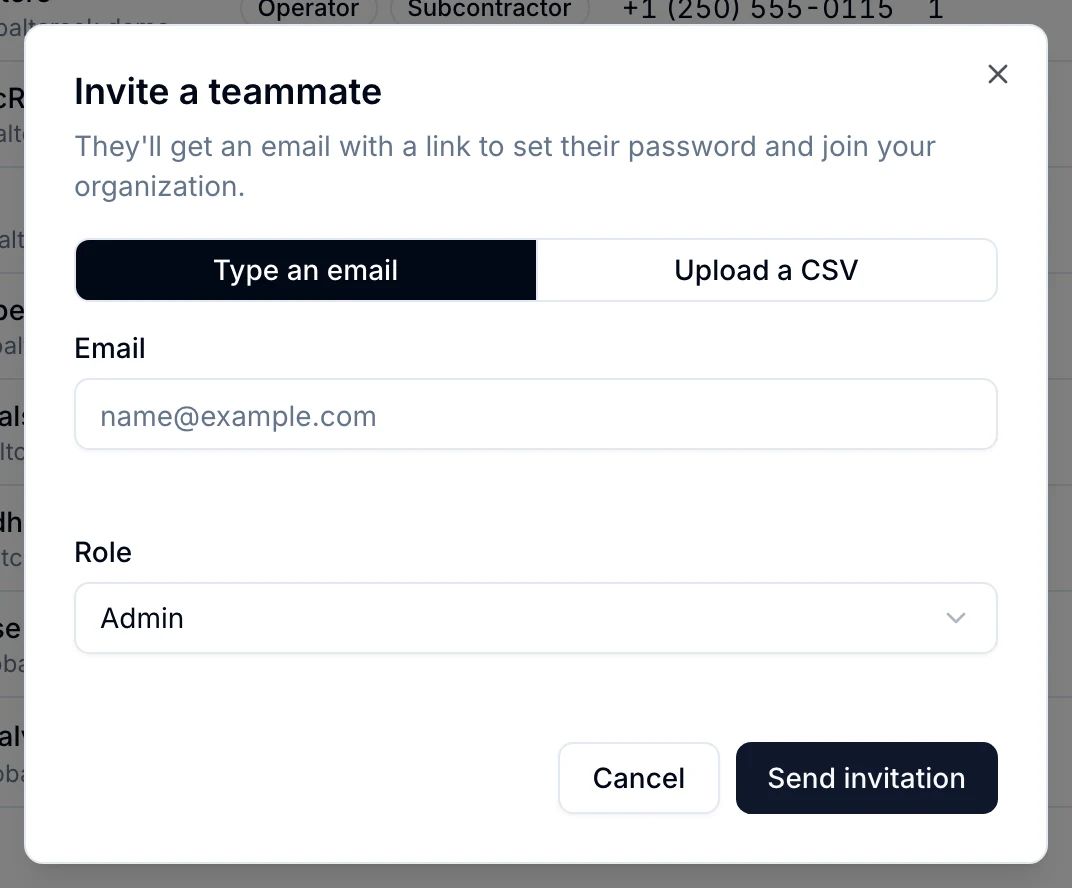
They get an email with a link to set their password and join. Until they accept, they show under Invited at the bottom of the People page.
You can only invite roles below your own. An owner can invite admins, dispatchers and operators. An admin can invite dispatchers and operators. A dispatcher who has been given Manage users can invite operators only, so the role is already filled in for them.
Mark an operator as a subcontractor
When an owner or admin invites an operator, the window also shows a Subcontractor switch. Turn it on for someone you pay a flat amount per job instead of by the hour. They see their own earnings in the app, and what you owe them shows on the Payouts page. You can change this later from the person’s panel.
Invite several people from a spreadsheet
If you’re adding a whole crew, you can upload a CSV file with up to 50 people.
- Click Invite user, then choose Upload a CSV.
- Click Download template if you want a file that’s already set up. Each row is one person: their email, then their role.
- Click Choose a CSV file, or drag the file onto the window.
- Check the summary. Rows with a problem, like an address that isn’t an email or a role Dispatch doesn’t know, are listed so you can fix them.
- Click the send button. It shows how many invitations are ready, for example Send 12 invitations.
If some invitations don’t go out, they’re listed under These didn’t go out so you can try those people again.
Resend or cancel an invitation
Owners and admins see pending invitations under Invited on the People page. Invitations expire after 3 days.
- Find the invitation under Invited.
- Open the menu at the end of the row.
- Choose Resend to send a fresh link, which also starts the 3 days again, or Revoke to cancel it.

A revoked invitation can’t be accepted anymore. You can always send a new one later.